Instance Sidechain
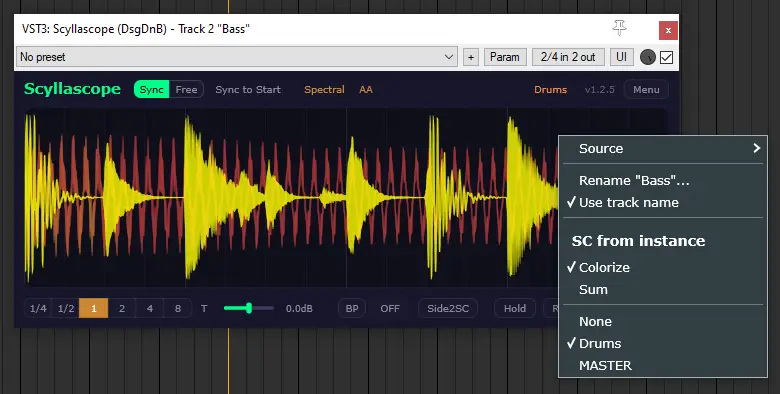
Scyllascope instances can communicate with each other. By selecting another instance in the Context Menu, its waveform is sent as a sidechain signal and displayed as an overlay on top of the current waveform. This makes it easy to visually compare two signals side by side — for example, a kick drum and a bass line on separate tracks.
Options
- SC from instance — select which instance to overlay. The list shows all active Scyllascope instances by name.
- Colorize — uses the track color from the DAW for the overlay waveform (VST3 only).
- Sum — displays the sum of both signals instead of showing them separately.
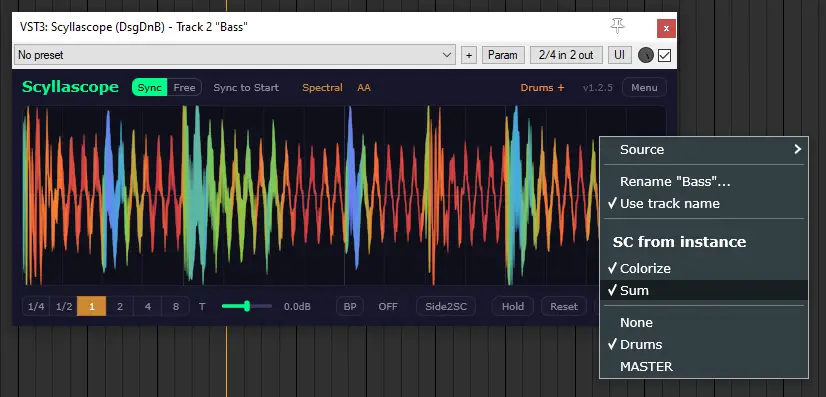
- None — disables the overlay.
TIP
Linked instances must share the same Division setting. Since version 1.2.6, this is handled automatically.
Sidechain priority
If multiple sidechain sources are available, the priority order is:
- Side2SC (side signal as sidechain)
- Instance sidechain (selected in context menu)
- External sidechain (routed to inputs 3/4)
Use cases
- Kick and bass relationship — overlay the kick drum and bass line to check how they sit together, spot phase issues, and fine-tune sidechain ducking.
- Sum check — use Sum mode to preview what two signals look like combined— useful for catching phase cancellation.