Recorder
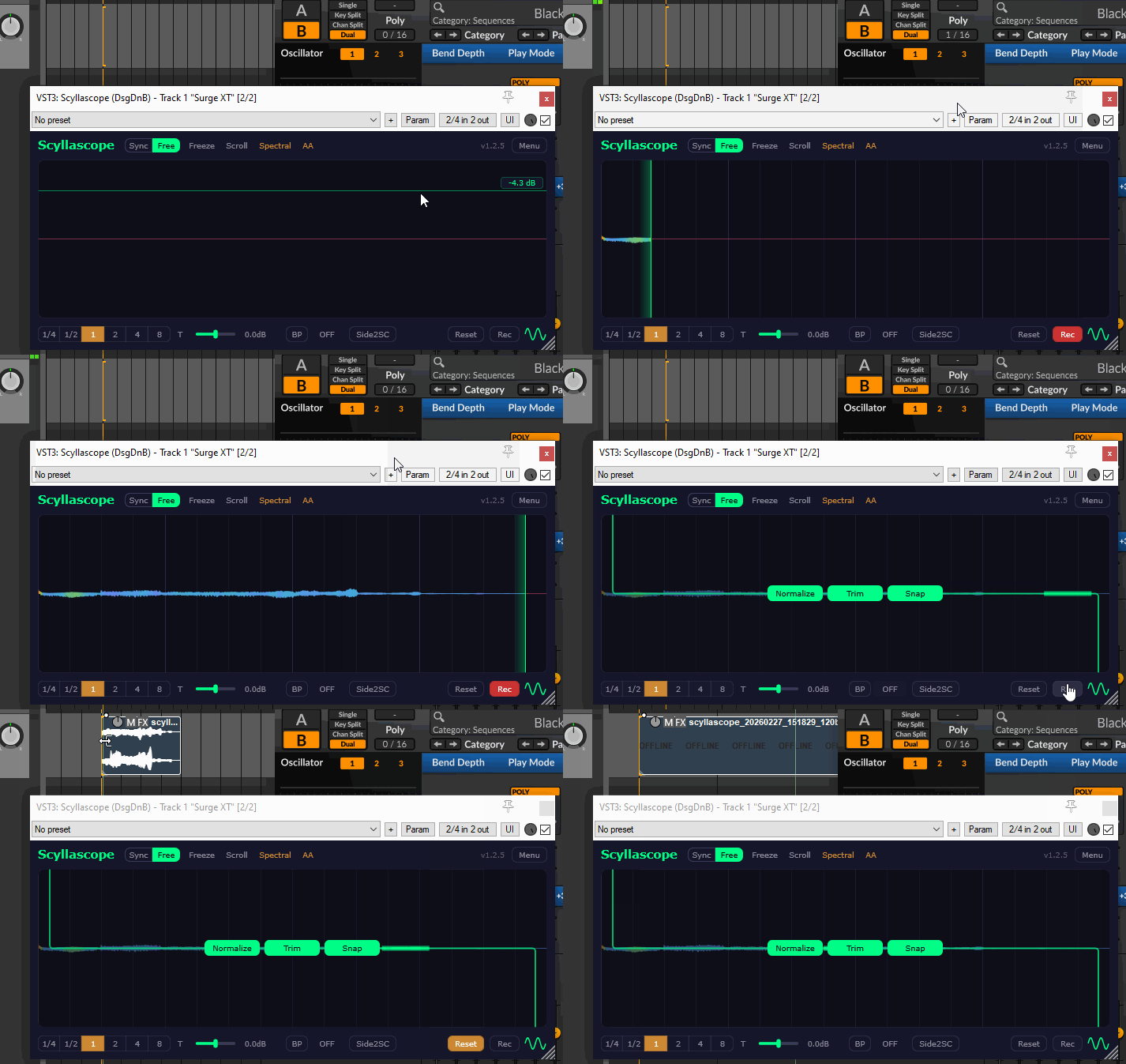
Recording
Press the Rec button to arm the recorder. Recording starts automatically as soon as audio enters the plugin and continues until the end of the visible time range (set by the Division Selector).
Export options
After recording is finished, you can apply preprocessing before exporting:
- Normalize — normalizes the audio to 0 dB.
- Trim — removes silence at the end of the recording.
- Snap — pads the end with silence to the nearest grid division, keeping the file length clean.
Drag & Drop
To export, drag the waveform icon next to the Rec button onto your arrangement or any folder. The audio file is created in the Rec Folder at the moment of the drag (see Menu → Open Rec Folder).
You can drag audio at any time, not just after recording — any sound currently in the buffer can be exported this way. Preprocessing options (Normalize, Trim, Snap) are also available via the right-click context menu on the waveform icon.
Use case
This can be a quick way to resample — play a synth, tweak the knobs, and drag the result straight into your arrangement as a new audio clip. Also handy for building sample packs from your own projects.