Menu
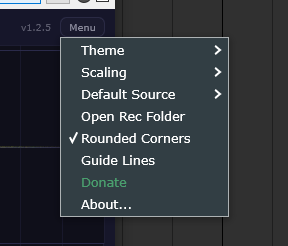
Theme
A list of built-in and custom themes. Also includes:
- Online Editor — opens the Theme Editor in your browser, where you can create and customize themes.
- Open Themes Folder — opens the folder where custom themes are stored.
Scaling
Controls the UI scale of the plugin window.
- Small
- Normal
- Large
Default Source
Sets the default audio source for new instances of the plugin.
- Left — left channel only
- Right — right channel only
- Mid — mid signal (sum of left and right)
- Peak — whichever channel has the higher level
Open Rec Folder
Opens the folder where recorded audio files are saved.
Rounded Corners
Toggles rounded corners on UI elements. You can also customize the corner radius in overrides.json.
Guide Lines
Enables horizontal guide lines and a decibel scale on the right side of the display, making it easier to read signal levels.
Donate
A link to support the developer.
About
Shows the plugin version and credits.